Toolbar popup
Click the icon, or press Alt+Shift+C, for a quick answer.
Browser extension · v1.0.0
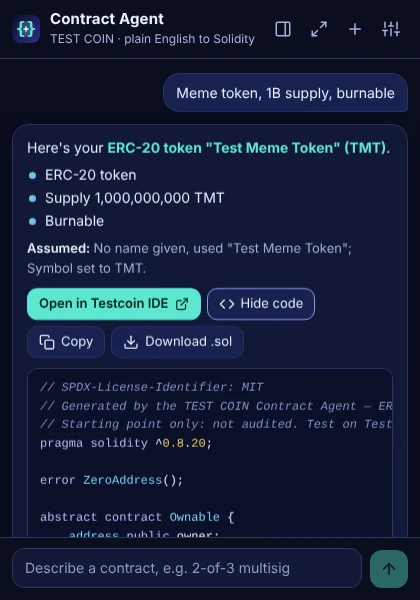
The TEST COIN Contract Agent, now in your browser. Ask in plain English from the toolbar, a side panel or the right-click menu. It runs on your device, so it works offline.
.zip · 160 KB · Chromium 116+ · Free, no account, no analytics
Chrome only installs extensions with one click from the Chrome Web Store, and this one is not listed there yet. So you load it yourself, the way developers do. Removing it later is just as easy.
Download the zip, then extract it into a folder you will keep. Your browser runs the extension from that folder, so don't delete it.
Paste this into the address bar. Web pages are not allowed to link to it.
chrome://extensions
Switch on Developer mode (top right), click Load unpacked, and choose the folder that contains manifest.json.
Click the puzzle-piece icon and pin Contract Agent. Then press Alt+Shift+S for the side panel, or type tc and a space in the address bar.
The chat is shared, so you can start in the popup and carry on in the side panel.
Click the icon, or press Alt+Shift+C, for a quick answer.
Keep the chat beside the page you are reading. Alt+Shift+S opens it.
Select a description on any page, right-click, and choose Generate Solidity.
Type tc, press Space, describe the contract, press Enter. It opens in a full tab.
Every answer includes the Solidity source, a plain list of what it built and what it assumed, and quick changes you can tap, such as making a token pausable or adding royalties. Open in Testcoin IDE sends the contract to the IDE with auto-compile on.
It asks for five browser permissions. Here is what each one is for.
The SHA-256 of testcoin-contract-agent.zip should match the value on the right. The same line is in SHA256SUMS.
79f92fb4b3f5f0708b35bcaf5897e328471288a2860aa9acb3eac4af80dab0d3
Windows (PowerShell)certutil -hashfile testcoin-contract-agent.zip SHA256
macOS and Linuxshasum -a 256 testcoin-contract-agent.zip
Chrome, Edge, Brave and other Chromium browsers, version 116 or newer. It was built and tested on Chrome. Firefox and Safari are not supported yet.
Not to generate contracts. The generator is built into the extension. You only need to be online to open the contract in the IDE.
Download the new zip, replace the files in the same folder, then press the reload icon on the extension's card at chrome://extensions. It does not update itself, and this page always carries the latest version.
Open chrome://extensions, find Contract Agent and press Remove. You can then delete the folder.
Test Coin, chain ID 5556667, symbol TEST, RPC https://rpc.uhjomedia.com. You can change all of it in the extension's settings.
No. They are starting points written by a rule-based generator. Test them on Test Coin first, and have anything that will hold real value reviewed before you deploy it.